Product Photography Background Removal for E-Commerce
The complete guide to preparing product images for online marketplaces. Meet Amazon, eBay, Etsy, and Shopify requirements using free AI background removal.
Quick Answer: For ecommerce product photography background removal, cut the product out on-device, then set pure white (#FFFFFF) for Amazon main images. Free bulk is 40 images per run with per-image PNG downloads. ZIP batch download is Pro. Catalog Studio Pro handles up to 500 images with Amazon, Shopify, Etsy, and eBay packs.
How do you prepare ecommerce product photos for Amazon, Shopify, Etsy, and eBay?
Remove the background on-device, then apply #FFFFFF for marketplace main images. Free bulk is 40 images per run; download each PNG. ZIP packaging is Pro. For up to 500 SKUs and marketplace size packs, use Catalog Studio. Match Amazon, Shopify, Etsy, and eBay fill and resolution rules after the cutout.
Why Product Photo Backgrounds Matter
Your product images are the first thing shoppers see. Visual presentation is a leading factor in online purchase decisions (source). Clean backgrounds matter for three reasons:
- Marketplace compliance: Amazon and eBay require specific background standards for main images
- Catalog consistency: Uniform backgrounds signal a professional, trustworthy storefront
- Search ranking: Amazon listings with compliant images rank better in search results
- Conversion impact: Clean product shots help shoppers focus on the product itself without visual distraction
Marketplace Image Requirements
Amazon Product Image Requirements
- Main image: Pure white background (RGB 255,255,255), mandatory (source)
- Size: 500 to 10,000 pixels on the longest side; 1,000 pixels or more enables zoom (2,000 x 2,000 is a practical target). No square aspect ratio is required
- Product fill: Product must fill 85% of the image frame
- Format: JPEG, PNG, TIFF, or non-animated GIF
- No text, logos, watermarks, borders, or props on main image, and no shadow running off the frame
The full rule set, including four figures most guides get wrong, is in our Amazon main image requirements guide.
Warning: Amazon can suppress listings that don't meet image requirements. Non-compliant main images may prevent your product from appearing in search results.
eBay Product Image Requirements
- Background: White or light solid color recommended, not required
- Minimum size: 500 pixels on the shorter side; eBay stores images up to 1600 x 1600
- No borders, text overlays, or watermarks
- Up to 24 images per listing
Etsy Product Image Requirements
- Background: White recommended for main image, lifestyle for secondary (source)
- Size: 2000 pixels on both sides recommended; Etsy stores at most 3000 pixels per side
- Transparency: transparent PNG areas show as black, so flatten onto white first
- Up to 20 images per listing
- Lifestyle images encouraged for secondary shots
Shopify Best Practices
- Background: Consistent across all products (white most common)
- Recommended size: 2048 x 2048 pixels
- Square aspect ratio preferred
- Consistent lighting and styling across catalog
How to Process Product Photos with AI
Single Product Photos
- Upload your product photo to Backgroundless
- Click "Remove Background" - the AI removes the background in seconds
- Switch to "Change Background" tab and select white
- Use Magic Brush to refine edges if needed (especially for reflective or transparent products)
- Download your marketplace-ready image
Bulk Catalog Processing
For product catalogs, use bulk processing for up to 40 images per free run, or Catalog Studio for a resumable job up to 500 images:
- Organize product photos into batches of 40 (or open Catalog Studio for larger jobs)
- Upload each batch to the bulk processor
- Processing stays on-device and uses WebGPU or a CPU worker pool
- Download each transparent PNG individually (ZIP batch download is Pro)
- Apply white backgrounds in the Change Background tab or via Catalog Studio marketplace packs
Time Savings Example
A 150-image catalog: Manual Photoshop cutouts can take a full workday. Free bulk covers 40 images per run with per-image PNG downloads. Catalog Studio Pro processes the full 150 in one resumable job (up to 500) and can package a ZIP with Amazon/Shopify/Etsy/eBay size packs. See Pro pricing.
Product Photography Tips for Better AI Results
1. Lighting
- Use soft, diffused lighting to minimize harsh shadows
- Light from multiple angles to reduce dark spots
- Avoid lighting that creates shadows on the background
- A lightbox or shooting tent works well for small products
2. Contrast
- Shoot against a contrasting background (not matching the product color)
- White products: shoot on gray or blue backgrounds for better AI detection
- Dark products: shoot on light backgrounds
3. Image Quality
- Shoot at the highest resolution your camera supports
- Use a tripod for sharpness
- Avoid heavy JPEG compression before processing
- RAW format gives best results after processing
Common Product Types & Tips
Clothing & Apparel
Use a mannequin or flat lay. The AI handles fabric edges well. For ghost mannequin effect, remove the background and the mannequin disappears, leaving just the clothing.
Jewelry & Accessories
Reflective surfaces can be tricky. Shoot against a matte background and use Magic Brush to refine edges around chains, stones, and reflective surfaces.
Electronics
Clean edges make electronics ideal for AI background removal. Watch for reflections on screens - turn devices off or use a matte screen protector during shooting.
Food & Beverages
Transparent containers (glass bottles, clear packaging) may need Magic Brush refinement. Shoot against a high-contrast background for the best initial results.
Need to create white backgrounds specifically? See our guide on how to change photo background to white.
Frequently Asked Questions
How much does product photo background removal cost?
With Backgroundless, single-image removal is unlimited and free. Free bulk is 40 images per run. ZIP batch download and Catalog Studio (up to 500 images) are a one-time Pro purchase ($29.99 during the Autumn sale (regular $49)). Professional retouching services still charge per image for advanced work.
Can AI handle reflective or transparent products?
Yes. Modern AI handles most products well. For reflective or transparent items, use the Magic Brush refinement tool to perfect the edges after initial removal.
Will the background be pure white enough for Amazon?
Yes. When you select white from the background options, the result is pure white (RGB 255,255,255), which meets Amazon's requirements.
Related Guides
Catalog Production Checklist
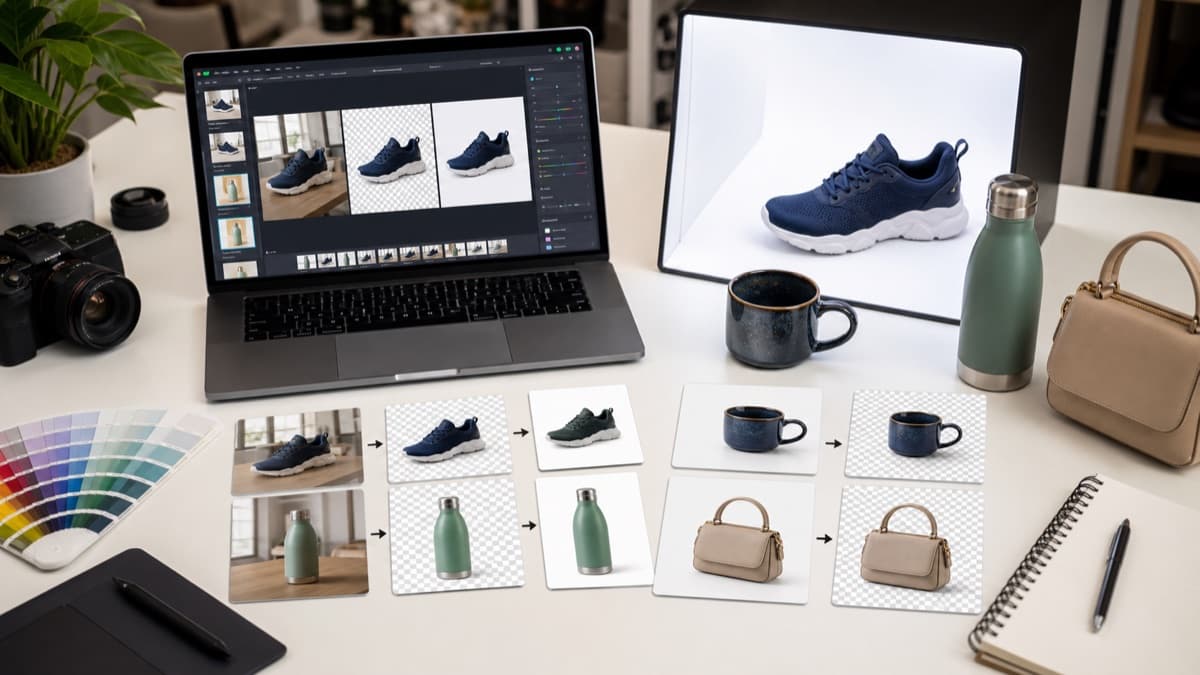
For ecommerce, background removal is part of a repeatable catalog system. The goal is not one good image; it is a set of images that look consistent across search results, category pages, product detail pages, email, and ads. Consistency makes the store look more trustworthy and reduces marketplace rejection risk.
The most expensive catalog problems happen after editing: mixed crops, different product scale, inconsistent white values, accidental shadows, and files exported at sizes that do not meet marketplace requirements. Build a checklist before processing a large batch so every image follows the same rules.
Group similar products first
Process shoes with shoes, jewelry with jewelry, apparel with apparel, and so on. Similar products usually need the same crop, background color, and shadow treatment, which makes batch review faster and more consistent.
Standardize canvas size
Pick the marketplace target before editing. A square 2000 by 2000 canvas works for many catalogs, but Amazon, Etsy, and Shopify can each have different recommendations. Resize after the cutout is clean.
Watch reflective edges
Jewelry, bottles, electronics screens, and glossy packaging often reflect the original background. If a colored reflection remains after background removal, use refinement or reshoot against a neutral backdrop.
Keep product scale consistent
A catalog looks messy when one product fills the frame and the next floats with too much empty space. Use the same product-fill rule across a batch, especially for marketplace main images.
Separate main and lifestyle images
Main listing images usually need plain backgrounds, while secondary images can show context. Do not over-clean every photo if the marketplace allows lifestyle shots that help shoppers understand size or use.
Audit the exported batch
Scan the downloaded PNGs (or a Pro ZIP) in a grid. Mixed background shades, uneven crops, and missed shadows are easier to spot when images are viewed side by side.
For a real store launch, run a small pilot batch before processing the full catalog. Pick five representative products: one dark item, one light item, one reflective item, one textured item, and one difficult shape. Process and review those first. If the pilot reveals crop, background, or reflection issues, update the shooting or editing checklist before touching the remaining catalog. This saves time because the expensive mistake is not fixing one image; it is discovering after a full Catalog Studio export that the whole batch used the wrong crop or white value.
Revisit the catalog checklist whenever a marketplace updates image requirements or your store changes theme. The same transparent cutout may need a white main image, a lifestyle secondary image, and an ad-safe crop. Keep notes about the export size, background value, and crop rules used for each channel so future batches match the existing catalog. This makes seasonal product refreshes much faster and keeps new images aligned with old listings, even when a different person prepares the next upload.
Research anchors
- Amazon product image requirements - Official marketplace guidance for main product image quality and background rules.
- Shopify product media help - Official Shopify guidance for managing product images and media in a store.
- Google Search Central image SEO guide - Image context and descriptive metadata support product image discovery.
A product image batch is ready when each file meets the marketplace requirements, the product scale feels consistent, the background color is uniform, and no image contains obvious leftover pixels from the original scene.
Process Your Product Catalog Free
Remove backgrounds from your entire product catalog with free AI-powered bulk processing.
library_addStart Bulk Processing Free